Recent Posts
- Job search privacy: Control who can see your profile
- Physician Market Report Q2 2026: What the Data Is Showing Right Now
- Onboarding tips from a CRNA: How I set myself up for success in every new role
- How Baptist Health Doubled Physician Applications Year Over Year
- Physician Market Report Q1 2026: What the Data Is Showing Right Now
Most Popular





Job search privacy: Control who can see your profile

Summary
- Discover how DocCafe's customizable privacy settings let physicians and APPs control exactly who sees their profile.
- Learn how to stay discoverable while keeping your identity confidential, using tools like confidential profiles and protected email aliases that shield your real contact info.
- Review your visibility options, from opting out of employer search entirely to unlocking your details only when you choose to apply — perfect for passive or confidential job seekers.
- Take control of your job search by setting up privacy preferences and notification controls.
Job searching can feel exposed — especially when your current employer might see you're looking. That's why privacy matters so much to physicians and advanced practice providers (APPs) during a search, and it's exactly what DocCafe helps you protect. You get full control over your visibility, from start to finish: keep your profile out of employer search results, hide identifying details until you're ready to apply, protect your phone number and personal email address, and manage your alerts as you go.
This guide walks you through how each privacy setting works, how to update them, and what happens when you apply or share information directly with an employer.
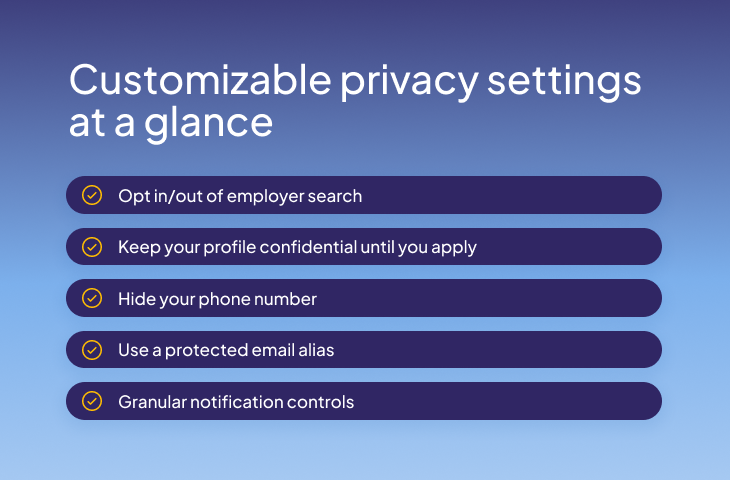
Why privacy matters in your job search
We understand that your privacy needs can change as your job search progresses. At first, you might want to search quietly, with your profile completely hidden. Later, you may be open to employers contacting you about opportunities. Wherever you are in the process, DocCafe lets you adjust your settings to match.How to set up your privacy controls
It only takes a few minutes:- Log in to your DocCafe account
- Click Privacy Settings in the left navigation
- Toggle the controls to match your comfort level
1. Decide whether employers can find you at all
The first setting is the simplest and most powerful: List me in the candidate search system so employers can find me.
Check it, and you're discoverable — recruiters and hiring managers can view your profile and reach out directly. That's a huge advantage if you’re looking to make a change more quickly.
Uncheck it, and your profile will not appear in employer candidate search.
2. Stay confidential until you're ready
Want to be findable and protected? Turn on Hide any identifying or contact information from companies until I contact them.With a confidential profile, employers can only see your qualifications, but your name, phone number, address, work experience and resume stay hidden. To a recruiter, you’ll appear as just your initials. This way, you can get discovered for your skills and employers can contact you directly through the platform, but your private details remain locked until you apply. Once you do, your personal information becomes visible to that employer only.
3. A protected email alias that shuts off when you do
DocCafe provides candidates with a protected email alias.Messages route through an alias that forwards to your personal inbox and if you opt out of searches or deactivate your profile, we switch that forwarding off. Your personal email address will only be visible if you include it on your resume or an application.
4. Notification controls
You're in charge of how much you hear from us, too. Notification settings let you opt in or out of email and text alerts for new job matches or unread messages, so your inbox reflects your preferences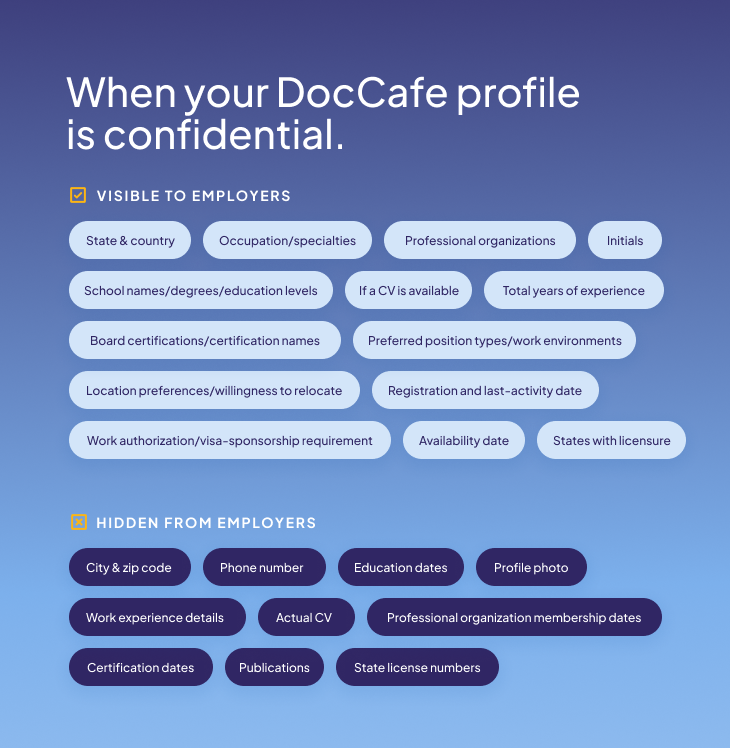
Important note
While your phone number and email address can remain hidden from employers through your DocCafe account, if either are included on a resume or application you’ve submitted, an employer may hold on to it and reach out later.Take control today
Create your free DocCafe account to search physician and APP jobs, then review your privacy settings and decide how employers can find and contact you.FAQs
Can I search for jobs without my current employer finding out?
Yes. You can opt out of the candidate search system or keep your profile confidential.
Will employers see my email address?
DocCafe assigns you an email alias that forwards to your personal inbox, so your real address stays hidden. If you opt out, forwarding will be turned off. It’s important to note that personal email may become visible if you include it in a resume or application.
Can I hide my name and resume from recruiters?
Yes. With a confidential profile, your identifying details stay hidden until you choose to apply for a specific job. Once you do, they unlock only for that employer.
What makes DocCafe's privacy controls different?
While most others only offer account deactivation, DocCafe offers a full suite of privacy controls, including confidential profiles, hidden contact info and protected email aliases.
Can I change my settings later?
Absolutely. Every setting is adjustable anytime. Just keep in mind an employer that viewed, saved or received your information through a resume or application prior to updating your privacy settings may still be able to contact you.
All information, discussions and opinions contained within this blog or otherwise on the website or any linked materials (the “Blog Content”) is for general informational purposes only. All Blog Content is based on the author's opinions and experiences and is not necessarily representative of our opinions as an organization. It should not be considered as tax/financial advice, legal advice, compliance advice, health advice or other professional advice and does not constitute the practice of any medical, nursing or other professional healthcare advice, diagnosis or treatment or provision of legal services. You should seek professional assistance for any concerns or issues. If you or any other person has a medical concern, you should consult with your healthcare provider or seek other professional medical treatment immediately. While we strive to provide accurate and up-to-date information, we make no warranties or representations regarding the completeness, reliability, or accuracy of the Blog Content. Your use of the Blog Content is solely at your own risk and we will not be liable for any damages or losses arising from the use of, or reliance on, any Blog Content.
Terms of Use
(Rev. February 24, 2026)
These Terms of Use and Arbitration Agreement (the “Terms”) apply to all websites, portals or pages owned or operated by Aya DART, LLC dba DocCafe (collectively, “DocCafe” or “we”), including those accessible through the domain and subdomains of doccafe.com, medjobcafe.com, nursingjobcafe.com, dentistjobcafe.com, alliedhealthjobcafe.com, pharmacistjobcafe.com, biotechjobcafe.com, hiringopps.com, and interviewopps.com (collectively, the “DocCafe Sites”).
I. GENERAL USES AND RESTRICTIONS
By accessing and using the DocCafe Sites, you agree on your behalf and on behalf of any entity or person on whose behalf you are accessing the DocCafe Sites (collectively, “You”) to abide by the Terms. DocCafe permits You to use and access the DocCafe Sites for lawful purposes only and only in a manner consistent with the Terms. Your agreement to the Terms is a condition of being granted access to and use of the DocCafe Sites. If You do not agree with the Terms, You may not access the DocCafe Sites and must exit the DocCafe Sites immediately. The Terms apply to all visits and use of the DocCafe Sites, as well as to the content, information, recommendations, or services provided or transmitted on or through the DocCafe Sites. By using and accessing the DocCafe Sites, You represent that You are at least 18 years of age, have the authority to enter these Terms on Your own behalf and on behalf of the organization or entity on whose behalf You are using or accessing the DocCafe Sites, and that all information provided by You, including, but not limited to Your identity, contact information, experience, qualifications, available positions, and facility details, is accurate and current. You shall be responsible for any violation of the Terms by You, Your agents, or Your employees.
II. CANDIDATE-SPECIFIC TERMS
For purposes of this Section II of the Terms, (i) “Employers” means individuals and/or organizations seeking Candidates, or seeking to make available information regarding employment openings, on their behalf or other’s behalf; (ii) Candidates” means individuals searching for employment openings or information related to their personal employment or job search; and (iii) all references to “You” shall mean You in Your capacity as a Candidate. As a Candidate, You are permitted to use the DocCafe Sites and its content solely for non-commercial purposes.
A. No Guarantee
DocCafe does not guarantee that You will receive any employment or job offers through the DocCafe Sites and is neither Your employer nor Your agent based solely on Your usage of the DocCafe Sites. DocCafe does not have authority to act or make employment decisions on behalf of Candidates or Employers. Nothing in the Terms or on the DocCafe Sites should be construed as creating an agency relationship between DocCafe and Candidates or DocCafe and Employers.
DocCafe does not guarantee that the information posted to the DocCafe Sites is true or accurate. DocCafe assumes no responsibility, and disclaims all liability for the content, accuracy, completeness, legality, reliability, or availability of any job positions, or other information submitted by any Employer or other user of the DocCafe Sites. Each Candidate is responsible for gathering their own information regarding a position posting prior to entering into any discussion or agreement with a potential Employer.
B. Registration and Personal Information
When You register, the personal information You provide is recorded in DocCafe’s database and you authorize DocCafe to make such information available to Employers and DocCafe’s affiliates. You may change, update or delete Your personal information from the DocCafe Sites at any time. Information that You have posted may have been recorded by Employers. This may result in unsolicited messages from those third parties for which DocCafe is not liable. In certain circumstances, You may have clicked through to the DocCafe Sites through another website; if You provided any information to that linked website prior to arriving onto the DocCafe Sites, DocCafe is not liable for the use of that information. Wherever You reside or from whichever country You are using the services and/or submit information, You consent to use of Your information consistent with DocCafe’s Privacy Policy, in the United States.
C. Posted Candidate Data
Employers can view a Candidate’s posted profile details, contact information, credentials, resume, and curriculum vitae on the DocCafe Sites and its affiliates’ sites. DocCafe offers Candidates a privacy setting that limits the amount of Candidate information that can be obtained by Employers through the DocCafe Sites or its affiliates’ sites. You may want to consider what information You wish to be posted depending on whether Your job search is common knowledge to Your colleagues, current employer or staff.
DocCafe is not responsible for how Your posted information is utilized by those that take it from the DocCafe Sites or its affiliates’ sites. If You choose to post Your information to be open to Employers, those Employer’s users may access Your information and place it in their own company data file. Once Your information has been removed from the DocCafe Sites or its affiliates’ sites and placed in an Employer data file, DocCafe is not able to access or assist in any removal from those outside company files. DocCafe is also not responsible for any use or sale of such information from that point. While You may change privacy settings at any time, changing Your settings will not prevent Employers that already had access to Your information from contacting You.
You agree that You are the only person responsible for posting Your information to the DocCafe Sites and any consequences as a result of such posting is Your sole responsibility.
D. Correspondence
The messaging features of the DocCafe Sites allow Employers to establish direct contact with You (without revealing Your name or identifying information, if You enabled the appropriate privacy settings). You may also be notified automatically of any job opportunities that match Your specialty or geographic preferences. You may choose when and if You want to respond to those messages and opportunities.
Responding to a message or applying to a position may result in an Employer obtaining identifying information directly from Your response. DocCafe is not responsible for any information released by You to an Employer, including any response to correspondence You receive on the DocCafe Sites.
E. Fraudulent Access or Use
Email and online fraud are ongoing concerns for all internet businesses. If You are the recipient of an email that appears to come from DocCafe and is a phishing email, spam or presents a position that seems too good to be true, please contact DocCafe immediately. If You are asked for Your log in information, please do not provide it and contact DocCafe immediately.
III. RESTRICTED SITES; REGISTERED USERS
DocCafe has restricted access to certain portions of the DocCafe Sites (collectively the “Restricted Sites”), to users with legitimate reasons for using such Restricted Sites who have registered with DocCafe or to whom DocCafe has otherwise provided an account, username or password (the “Registered Users”). You agree that the entirety of the Restricted Sites, including, but not limited to their design, source code, databases, content, and data or materials stored on, generated by, created using, or transmitted through them shall be considered Confidential Information, as defined below. You agree that You will only use and access the Restricted Sites for the limited purpose of finding employment or finding a candidate to fill an employment opportunity, providing professional or professional networking information to the other users of the DocCafe Sites, or an existing or prospective business relationship or agreement between You and DocCafe (the “Permitted Uses”).
You agree any username or password used by You to access Restricted Sites is Confidential Information, as defined below. You agree not to use another Registered User’s username and password nor to allow any other person to use the username or password used by You. You are solely responsible for all activity conducted using Your username or password. You will immediately notify DocCafe if You become aware of any loss or theft of Your username or password or any unauthorized use of Your username and password. DocCafe is not liable for any loss or damage arising from Your failure to comply with these obligations. DocCafe reserves the right to reset, lock, delete, or suspend Your account or login credentials at any time and for any reason.
IV. CONFIDENTIAL INFORMATION
When accessing or using the Restricted Sites, You may be able to upload, download, receive, transmit, view, create, enter, access, post, share, display, or otherwise use or access information, documents, or other material that is confidential in nature (collectively “Confidential Information”). Confidential Information includes, but is not limited to: (i) information about employers, including job postings, company profiles, or recruiter contact details, (ii) resume/CV content, cover letters, and other candidate application materials uploaded to the platform, or (iii) communication records between candidates and potential employers or recruiters through the messaging system. You agree to only use Confidential Information for lawful, Permitted Uses or as otherwise permitted by law. You agree to limit access to Confidential Information to only those employees or agents of Yours who reasonably require access to such information for the Permitted Uses. If You provide any Confidential Information to Your employees or agents, You shall require all such employees or agents to abide by these Terms, as well as any applicable laws or agreements relating to such information. You agree that You will be responsible for any breach of any provision of these Terms by Your employees or agents. You shall take all necessary precautions, but not less than a reasonable standard of care, to protect the confidential nature of the Confidential Information, including, without limitation, reasonable security measures and all precautions You use with respect to Your own confidential information.
In the event You or any of Your representatives are requested or required by any government or governmental agency or authority to disclose any of the Confidential Information (by oral questions, interrogatories, requests for information or documents, subpoena, civil investigative demand, any informal or formal investigation by any government or governmental agency or authority or otherwise), You will notify DocCafe promptly in writing so that DocCafe may seek a protective order or other appropriate remedy or, in DocCafe’s sole discretion, waive compliance with these Terms. You agree not to oppose any action by DocCafe to obtain a protective order or other appropriate remedy. In the event that no protective order or other remedy is obtained or DocCafe waives compliance with these Terms, You agree to furnish only that portion of the Confidential Information, which You are advised is legally required.
If You discover or are notified of a breach or potential breach of security with respect to any Confidential Information provided or made available by DocCafe, You shall immediately: (i) notify DocCafe of such breach or such potential breach at the address specified below, (ii) immediately investigate such breach or such potential breach and inform DocCafe of the results of such investigation, and (iii) assist DocCafe as reasonably necessary to enforce DocCafe’s rights and to enable DocCafe to comply with any state or federal law requiring the provision of notice of any security breach with respect to the breach.
Notwithstanding any other provision of this Agreement, Confidential Information shall not include any information, data, material, document, patent or idea, which: (i) is within the public domain prior to the time of disclosure or thereafter becomes within the public domain other than as a result of disclosure by You or Your representatives in violation of these Terms; (ii) was, on or before the date of disclosure in Your possession, as shown by You, unless it was acquired by You from a third party who was under an obligation of confidentiality to DocCafe; (iii) is acquired by You from a third party not under an obligation of confidentiality to DocCafe; or (iv) was independently developed by You without the use of Confidential Information or other breach of these Terms.
V. DOCCAFE’S RETENTION OF PROPRIETARY RIGHTS
DocCafe hereby grants You with a limited, revocable, temporary, non-exclusive, and non-transferable ability to access and use the DocCafe Sites in accordance with these Terms. You expressly acknowledge and agree that DocCafe transfers no ownership, intellectual property interest, or title in or to the DocCafe Sites, the Confidential Information, or any information or data contained therein to You or anyone else. All text, graphics, user interfaces, visual interfaces, photographs, sounds, artwork, computer code (including html code), programs, software, products, information, and documentation as well as the design, structure, selection, coordination, expression, “look and feel,” and arrangement of any content contained on or available through the DocCafe Sites, unless otherwise indicated, are owned, controlled, or licensed by DocCafe. You may not copy, store, reproduce, transmit, distribute, display, rent, lease, sell, modify, alter, license, sublicense, or commercially exploit the DocCafe Sites, DocCafe’s name, DocCafe’s logo, DocCafe’s marks, or any other data or information provided on or through the DocCafe Sites in any manner or use the DocCafe Sites in any manner not expressly permitted by these Terms.
The DocCafe Sites are Copyright © 2026 Aya DART, LLC dba DocCafe. All rights reserved. Your unauthorized use of the DocCafe Sites, Confidential Information, DocCafe logos, names, or marks, or any other information or data contained therein may violate intellectual property or other proprietary rights laws, as well as other laws, regulations, and statutes.
VI. COMPLIANCE WITH APPLICABLE LAWS
You agree to abide by all applicable local, state, national, and international laws, and regulations with respect to Your use of the DocCafe Sites or any Confidential Information or other information obtained by You while using the DocCafe Sites. The Terms are also subject to any applicable export laws, orders, restrictions, or regulations. You shall not export the DocCafe Sites or access or use the DocCafe Sites without complying with such laws, orders, restrictions, or regulations.
VII. ARBITRATION AND CLASS ACTION WAIVER
A. BINDING ARBITRATION
You and DocCafe mutually agree that any and all claims arising out of or relating to Your use of the DocCafe Sites, whether asserted during or following Your use of the DocCafe Sites, will be subject to binding arbitration and not by a lawsuit or resort to court process, including but not limited to any information provided on or documents uploaded to the DocCafe Sites and any activity relating to your application for or seeking employment or engagement with any entity through the DocCafe Sites, including but not limited to any application process, submittal of pre-employment information, or submittal of personal information, whether asserted during or following Your use of the DocCafe Sites. You and DocCafe agree that the binding arbitration required by this Agreement applies to all covered claims arising from Your use of the DocCafe Sites including any past, present or future use of the DocCafe Sites. The claims covered by this Agreement include, but are not limited to, contract claims, quasi-contract claims, equity claims, tort claims, wrongful termination claims, claims of discrimination, harassment or retaliation, wage claims, penalty claims, claims based on or arising out of any policy of DocCafe, claims for breach of confidentiality or misappropriation of trade secrets, claims for injunctive relief, claims alleging breach of privacy rights, and claims based on or alleging violations of the California Labor Code, California Fair Employment and Housing Act, the Americans With Disabilities Act, California Pregnancy Leave Law, California Consumer Privacy Act, or any other applicable public policy, federal, state or other governmental law, constitution, statute, regulation or ordinance. To the extent required by Executive Order 13665, this Agreement only requires arbitration of claims arising under Title VII of the Civil Rights Act of 1964 or any tort related to or arising out of sexual assault or harassment where You voluntarily consent to arbitration after a dispute arises.
This Agreement is binding upon, and inures to the benefit of, the Parties and their respective successors and assigns. In addition, You agree that this Agreement is intended to benefit and may be enforced not only by DocCafe, but also by any of DocCafe’s officers, directors, owners, clients, shareholders, employees, managers, agents, attorneys, insurers, sureties, benefit plans, clients, and its affiliated, related, parent, sister, or associated business entities.
B. Arbitration Procedures
The binding arbitration and selection of a neutral arbitrator will be conducted in conformity with the procedures of the Federal Arbitration Act (9 U.S.C. § 1 et seq.) and the California Arbitration Act (Cal. Code Civ. Proc., § 1280 et seq.), and if You are located outside of California, in accordance with any other applicable arbitration law. The arbitrator shall have the authority to resolve all portions of the dispute, including disputes relating to the interpretation or enforceability of this Section VII, and may utilize procedural motions challenging the legal sufficiency of a claim or defense, such as summary judgment motions, motions for judgment on the pleadings, requests for preliminary injunctions or equitable relief, and similar proceedings. The parties shall be entitled to sufficient discovery to adequately arbitrate their claims and defenses.
The arbitrator will issue a detailed written decision and award resolving the dispute. The arbitrator’s written opinion and award shall decide all issues submitted and set forth the legal principle(s) supporting the decision. The decision or award of the arbitrator shall be final and binding upon the parties. The arbitrator shall have the power to award any type of legal or equitable relief that would be available in a court of competent jurisdiction including, but not limited to attorneys’ fees, when such relief is available under the applicable statute or law. Any arbitral award may be entered as a judgment or order in a court of competent jurisdiction. The parties agree that any relief or recovery to which they are entitled arising out of uses described in Section VII.A above shall be limited to that awarded by the arbitrator.
For claims determined to involve non-waivable statutory rights and to the extent required by law, You will not be required to pay any administrative fees or costs, including arbitrator’s fees, beyond the fees and costs which would have been incurred by You, if any, had the dispute arbitrated under this provision been litigated in state or federal court.
C. WAIVER OF RIGHT TO JURY OR COURT TRIAL
BY USING THE DOCCAFE SITES, YOU ARE GIVING UP YOUR RIGHTS TO HAVE THE CLAIMS DESCRIBED IN SECTION VII.A ABOVE DECIDED IN A COURT OF LAW BEFORE A JURY OR JUDGE, AND INSTEAD ARE AGREEING TO FINAL AND BINDING ARBITRATION BEFORE A NEUTRAL ARBITRATOR.
WAIVER OF RIGHT TO BRING CLASS, COLLECTIVE, OR REPRESENTATIVE ACTION TO THE FULLEST EXTENT PERMITTED BY LAW, TO THE FULLEST EXTENT PERMITTED BY LAW, YOU AND DOCCAFE AGREE THAT NO CLAIM COVERED BY THIS SECTION VII MAY BE PURSUED AS A CLASS, COLLECTIVE, OR REPRESENTATIVE ACTION AND ALL SUCH CLAIMS MUST BE PURSUED ONLY ON AN INDIVIDUAL BASIS. Notwithstanding the foregoing, to the extent any Party asserts a representative claim that is determined to be non-waivable, THE PARTIES agree that any and all such representative claims may be asserted and determined only by binding arbitration in accordance with this Section VII.
VIII. PROHIBITED USES; YOUR TRANSMISSIONS
You may not use the DocCafe Sites to send, upload, share, email, post, publish, edit, modify, or otherwise transmit material or information, or use information obtained through the DocCafe Sites, in any manner that: (i) violates any applicable law or regulations; (ii) is false or misleading; (iii) is defamatory, offensive, obscene, harassing, or discriminatory, including on any basis protected by applicable federal, state or local law; (iv) violates or infringes on the intellectual property or privacy rights of any other person, including but not limited to rights arising from copyrights, trademarks, patents, or a person’s likeness; (v) constitutes unsolicited marketing efforts, including “junk email,” “spam,” or chain letters; (vi) interferes with or disrupts the performance of the DocCafe Sites or servers or systems used to host or operate the DocCafe Sites, DocCafe’s servers or systems, or the servers or systems of other users of the DocCafe Sites; or (vii) attempts to circumvent or misuse the user authentication or security measures of the DocCafe Sites.
By sending, uploading, sharing, emailing, posting, publishing, editing, modifying, or otherwise transmitting content to the DocCafe Sites or submitting any content to or through the DocCafe Sites or to DocCafe relating to the DocCafe Sites (including documentation or feedback), You automatically grant (or warrant that the owner of such rights has expressly granted), DocCafe and its affiliates a worldwide, perpetual, royalty-free, irrevocable, nonexclusive right and license to use, reproduce, modify, adapt, publish, transmit and distribute such content in any form, medium, or technology now known or later developed. In addition, You warrant that all so-called moral rights in the content have been waived. DocCafe assumes no responsibility for the deletion of or failure to store any posting, transmission, documents, or information stored or submitted on the DocCafe Sites. Notwithstanding the foregoing, this section is not intended to and does not supersede any applicable laws or separate written agreements between You and DocCafe that are signed by an authorized representative of DocCafe, to the extent such laws or agreements restrict or govern DocCafe’s use of confidential information provided by You to DocCafe as part of a business transaction.
DocCafe is not responsible for screening, policing, editing, or monitoring Your or another Registered User’s transmissions, submissions, and postings. Accordingly, DocCafe encourages its Registered Users to use reasonable discretion and caution in submitting or reviewing any transmission or posting. Moreover, DocCafe does not make any representation with respect to, nor does it endorse the accuracy, completeness, timeliness, or reliability of any advice, opinion, statement, or other material displayed, uploaded, or distributed by You or any other Registered User. Nevertheless, DocCafe reserves the right to delete or take other action with respect to transmissions or postings (or parts thereof) that DocCafe believes in good faith violate the Terms or are potentially, unlawful, or harmful to DocCafe , its products, services, or goodwill.
IX. PRIVACY POLICY
Your use of the DocCafe Sites may be monitored, including to monitor usage levels, collect data and information, and to ensure compliance with applicable laws and agreements. Accordingly, if You access the DocCafe Sites You acknowledge and consent to DocCafe’s monitoring, collection and use practices. Please see DocCafe’s Privacy Policy for a summary of its practices in this regard.
X. Alleged Copyright Violations
It is the policy of DocCafe to take appropriate actions under the Digital Millennium Copyright Act and other applicable intellectual property laws. If You become aware of transmissions or postings that violate these rules or believe Your copyrighted work has been inappropriately used or made accessible through the DocCafe Sites, please notify DocCafe in writing at the address provided below.
XI. LINKS TO OTHER SITES
DocCafe may provide links, in its sole discretion, to other sites on the World Wide Web for Your convenience. These sites have not necessarily been reviewed by DocCafe and are maintained by third parties over which DocCafe exercises no control. Accordingly, DocCafe expressly disclaims any responsibility for the content, the materials, the accuracy of the information, and/or the quality of the products or services provided by, available through, or advertised on these third-party websites. Moreover, these links do not imply that DocCafe has endorsed any third party, any third-party website, or the products or services provided by any third party.
XII. DISCLAIMER
THE DOCCAFE SITES AND ALL INFORMATION, SERVICES, PROGRAMS, SOFTWARE, AND MATERIALS AVAILABLE ON OR THROUGH THE DOCCAFE SITES ARE PROVIDED ON AN “AS-IS” AND “AS AVAILABLE” BASIS AND MAY INCLUDE ERRORS, OMISSIONS, OR OTHER INACCURACIES. DOCCAFE MAY MAKE MODIFICATIONS AND/OR CHANGES TO THE DOCCAFE SITES OR TO THE INFORMATION, SERVICES, PROGRAMS, SOFTWARE, AND MATERIALS AVAILABLE ON THE DOCCAFE SITES AT ANY TIME AND FOR ANY REASON. YOU ASSUME THE SOLE RISK OF MAKING USE OF AND/OR RELYING ON THE INFORMATION, SERVICES, PROGRAMS, AND MATERIALS AVAILABLE ON THE DOCCAFE SITES. DOCCAFE MAKES NO REPRESENTATIONS OR WARRANTIES ABOUT THE RESULTS THAT CAN BE ACHIEVED FROM OR THE SUITABILITY, COMPLETENESS, TIMELINESS, RELIABILITY, LEGALITY, OR ACCURACY OF THE INFORMATION, SERVICES, PROGRAMS, AND MATERIALS AVAILABLE ON THE DOCCAFE SITES FOR ANY PURPOSE. DOCCAFE EXPRESSLY DISCLAIMS ALL WARRANTIES, EXPRESS OR IMPLIED, INCLUDING, WITHOUT LIMITATION, ANY WARRANTY OF MERCHANTABILITY, FITNESS FOR A PARTICULAR PURPOSE, OR NON-INFRINGEMENT OR ANY OTHER IMPLIED WARRANTY INCLUDING, BUT NOT LIMITED TO ANY IMPLIED WARRANTIES UNDER THE UNIFORM COMPUTER INFORMATION TRANSACTIONS ACT AS ENACTED BY ANY STATE. DOCCAFE ALSO MAKES NO REPRESENTATION OR WARRANTY THAT THE DOCCAFE SITES WILL OPERATE ERROR FREE OR IN AN UNINTERRUPTED FASHION OR THAT ANY FILES OR INFORMATION THAT YOU DOWNLOAD FROM THE SITE WILL BE FREE OF VIRUSES OR CONTAMINATION OR DESTRUCTIVE FEATURES. YOU UNDERSTAND AND ACKNOWLEDGE THAT YOUR SOLE AND EXCLUSIVE REMEDY WITH RESPECT TO ANY DEFECT IN, OR DISSATISFACTION WITH, THE DOCCAFE SITES OR ANY INFORMATION THEREIN IS TO CEASE USE OF THE DOCCAFE SITES.
MOREOVER, IN NO EVENT SHALL DOCCAFE BE LIABLE FOR ANY INDIRECT, PUNITIVE, INCIDENTAL, SPECIAL, OR CONSEQUENTIAL DAMAGES ARISING OUT OF OR RELATED TO THE USE OF, OR ACCESS TO, THE DOCCAFE SITES OR THE DELAY OR INABILITY TO USE THE DOCCAFE SITES, WHETHER BASED IN CONTRACT, TORT, STRICT LIABILITY, OR OTHERWISE, EVEN IF DOCCAFE HAS BEEN ADVISED OF THE POSSIBILITY OF SUCH DAMAGES. BECAUSE SOME STATES/JURISDICTIONS DO NOT ALLOW THE EXCLUSION OR LIMITATION OF LIABILITY FOR CONSEQUENTIAL OR INCIDENTAL DAMAGES, THE ABOVE LIMITATION MAY NOT APPLY. YOU ACKNOWLEDGE AND AGREE THAT YOUR SOLE AND EXCLUSIVE REMEDY FOR DISSATISFACTION WITH THE DOCCAFE SITES IS TO STOP USING THE DOCCAFE SITES.
NOTWITHSTANDING THE FOREGOING, TOTAL LIABILITY OF DOCCAFE FOR ANY REASON WHATSOEVER RELATED TO YOUR USE OF, OR ACCESS TO, THE DOCCAFE SITES AND ALL INFORMATION AND SERVICES THEREIN, OR WITH THE DELAY OR INABILITY TO USE THE DOCCAFE SITES, INFORMATION, OR SERVICES THEREIN, SHALL NOT EXCEED ONE HUNDRED DOLLARS ($100).
Applicable law may not allow for limitations on certain implied warranties, or exclusions or limitations of certain damages; solely to the extent that such law applies to You, some or all of the above disclaimers, exclusions or limitations may not apply to You, and You may have certain additional rights.
XIII. INDEMNIFICATION
You agree to defend, indemnify, and hold harmless DocCafe, its affiliates, officers, directors, employees, agents, licensors, clients, and subcontractors from and against any and all claims, damages, losses, liabilities, costs, and expenses (including attorneys’ fees) relating to or arising from: (i) Your use of the DocCafe Sites, (ii) Your violation of the Terms; (iii) Your violation of any third-party rights relating to or arising out of Your use of the DocCafe Sites, or (iv) Your violation of any law or regulation relating to, or arising out of, Your use of, or access to, the DocCafe Sites.
XIV. TERM AND TERMINATION
The Terms shall take effect immediately upon: Your access to, or use of, the DocCafe Sites after the Terms are posted or, if You have executed a separate agreement incorporating or referencing these Terms, the effective date of such agreement. DocCafe reserves the right to modify, change, or disable the DocCafe Sites or Your use of, or access to, the DocCafe Sites, at any time with or without notice. DocCafe shall not be liable for damages in connection with such terminations, disabling, modifications, or changes.
In addition, DocCafe reserves the right to modify or terminate the Terms at any time upon reasonable notice to You. You agree that DocCafe may provide reasonable notice of such modifications by posting the new or modified terms (the “Modified Terms”) on the DocCafe Sites and specifying an effective date that is at least 10 days after the date the Modified Terms are initially posted. You agree that if You continue to use the DocCafe Sites without written objection to DocCafe, You shall be considered to have accepted the Modified Terms as of the effective date stated therein. Such Modified Terms shall apply prospectively only. If the Terms are terminated or modified, these Terms shall apply only to pre-termination or pre-modification use, access, actions, or omissions.
You may terminate any of Your obligations under the Terms at any time by ceasing to use the DocCafe Sites and, if You are a Registered User, by notifying DocCafe of Your desire to terminate Your account. Upon termination, You must destroy all copies of Confidential Information in Your possession, custody, or control, except that You may be permitted to retain a copy of certain Confidential Information to the extent permitted in writing by DocCafe or where You are legally required to retain such records.
XV. NOTICES
All notices, requests, demands or other communications to DocCafe shall be made in writing and shall be addressed to:
Aya DART, LLC dba DocCafe
Attention: Legal
5930 Cornerstone Court West, Suite 300
San Diego, CA 92121
DocCafe may provide notice to You by posting on the DocCafe Sites or otherwise contacting You at Your last known email address or last known mailing address.
XVI. MISCELLANEOUS
- The Terms and any claims arising out of or relating to the Terms or Your use of the DocCafe Sites shall be governed by and construed in accordance with the laws of the State of California, without reference to its conflict of law principles. You hereby consent to the exclusive personal jurisdiction in any state or federal court or arbitral forum located in San Diego, California. If any provision of the Terms is held to be invalid, void, or unenforceable, all other provisions shall remain valid and be enforced and construed as if such invalid provision were never a part of the Terms. Unless otherwise provided herein, any dispute, controversy or claim arising out of or relating to this Agreement shall be submitted to binding arbitration before the office of Judicial Arbitration and Mediation Services (“JAMS”) located in San Diego, California, as the exclusive remedy.
- You acknowledge that any breach, threatened or actual, of the Terms will cause irreparable injury to DocCafe, such injury would not be quantifiable in monetary damages, and DocCafe would not have an adequate remedy at law. You therefore agree that DocCafe shall be entitled, in addition to other available remedies, to seek and be awarded an injunction or other appropriate equitable relief from a court of competent jurisdiction restraining any breach, threatened or actual, of Your obligations under any provision of the Terms. Accordingly, You hereby waive any requirement that DocCafe post any bond or other security in the event any injunctive or equitable relief is sought by, or awarded to, DocCafe to enforce any provision of the Terms.
- You may not assign Your rights or obligations to any other person or entity without DocCafe’s prior written consent. DocCafe may assign or transfer these Terms, and any rights or obligations under them, including any related accounts, in whole or in part, to any affiliate or to any successor entity as part of a merger, acquisition, corporate reorganization, internal restructuring, or other business transaction.
- No waiver, delay, or failure by DocCafe with respect to any right or provision under the Terms shall be deemed a waiver of any other provision or constitute a continuing waiver.
- No joint venture, partnership, employment, or agency relationship exists between You and DocCafe as result of the Terms or Your utilization of the DocCafe Sites.
- The headings in the Terms are for convenience or reference only and are not to be considered when construing the Terms.
- The Terms represent the entire agreement between You and DocCafe with respect to use of the DocCafe Sites. The Terms supersede all prior or contemporaneous communications and proposals, whether electronic, oral, or written between You and DocCafe that govern Your use of, or access to, the DocCafe Sites.
Privacy Policy
Date: February 24, 2026
Welcome to Aya DART, LLC dba DocCafe and MedJobCafe (“DocCafe,” “we,” or “us”). DocCafe is committed to protecting your online privacy, regardless of whether you are visiting as an Employer or Candidate. This Privacy Policy outlines DocCafe’s policies and practices relating to the collection, use, and disclosure of Personal Information through all websites, portals, or pages owned or operated by DocCafe, including those accessible through the domain and subdomains of doccafe.com, medjobcafe.com, nursingjobcafe.com, dentistjobcafe.com, alliedhealthjobcafe.com, pharmacistjobcafe.com, biotechjobcafe.com, hiringopps.com, and interviewopps.com (collectively, the “DocCafe Sites”). “Employer” means individuals and/or organizations seeking Candidates, or seeking to make available information regarding employment openings, on their behalf or other’s behalf. “Candidate” means individuals searching for employment openings or information related to their personal employment or job search.
DocCafe respects the privacy and the confidentiality of Employers’ and Candidates’ information, particularly their Personal Information. “Personal Information” is information that identifies you or can reasonably be linked to you, although it does not include any information that is available publicly or information that has been anonymized. This Privacy Policy explains how DocCafe collects, uses, discloses, and protects the information. Our Privacy Policy applies to all individuals that provide their Personal Information on DocCafe Sites, regardless of how that information is provided to us.
Collection and Use of Information
When you create an account and register for DocCafe Sites or their services or when you use any of the DocCafe Sites to manage an Employer’s account, you will be asked to submit certain Personal Information, be it through our website or a partner portal. The chart below details the Personal Information that we receive, how we use it, and to whom we may disclose it. We collect this information from you and from any additional sources listed below in the context of your search for employment or your role managing an Employer’s account.
| Categories of Information | How we use it | Categories of Recipients |
|---|---|---|
| Contact information: such as your name, home and work address, personal and/or work telephone numbers, personal and/or work email addresses | To open and maintain Candidate records, client records, and job postings; to communicate with you regarding your interest in a job opportunity, your application for employment, or updates on your candidacy; to tailor your experience with the DocCafe Sites, including showing you content that we think you might be interested in; or to communicate with Employers regarding their postings and any applications or candidates | With related entities; with Employer(s); with recruiters who view your profile; with certain authorized third parties for the purpose of providing specialized services to us (such as helping us to maintain and manage the information of Employers and Candidates, communicate with Employers and Candidates, service our website, for marketing, etc.); with select partners and affiliates that we believe may have or may facilitate offers or positions that may be of interest to you |
| Job-related information and qualifications: such as position applied for, work experience, education, awards, qualifications, certificates, licenses, financial relationships, and any other information you choose to provide in your resumes and/or applications | To allow third-party employer(s) to assess your suitability for a position and to determine any actual or potential conflict of interest; to tailor your experience with the DocCafe Sites, showing you content that we think you might be interested in | With related entities; with Employer(s); with recruiters who view your profile; with select partners and affiliates that we believe may have or may facilitate offers or positions that may be of interest to you |
| National identification information: such as your country of birth or the country where you are a registered national or citizen, and any visa or other right to work | To allow Employer(s) to determine your eligibility to work, applicable benefits, financial draws/taxes, and fulfill our obligations to relevant government authorities | With related entities; with Employer(s); with recruiters who view your profile |
| Other voluntary information: any voluntary information you may provide us in the course of your interactions with us (such as by sending an e-mail through the DocCafe Sites and/or to the addresses indicated on the DocCafe Sites, by calling, e-mailing, texting, or chatting online with our customer service team, by responding to surveys, or during the course of a job interview, which may be recorded and shared with Employers) | To handle your requests and to contact you when necessary or requested, including responding to your questions and comments and providing customer support; to improve the DocCafe Sites, customer service, and user experience; to tailor your experience with the DocCafe Sites, showing you content that we think you might be interested in; to allow Employer(s) to assess your suitability for a position | With related entities; with Employer(s); with recruiters who view your profile; with certain authorized third parties for the purpose of providing specialized services to us (such as helping us to maintain and manage the information of Employers and Candidates , communicate with Employers and Candidates, service our website, for marketing, etc.); with select partners and affiliates that we believe may have or may facilitate offers or positions that may be of interest to you |
| Preference information, such as your account settings, including privacy, preferred contact channel, and types of services/offers that interest you | To enhance your online experience, including as a way to recognize you and welcome you to the DocCafe Sites; to personalize your experience; and to provide you with customized content that we think you might be interested in Additional Sources of Personal Information: The DocCafe Sites’ interaction with your browser or devices and cookies, pixels, and other technologies tracking the pages you visit across websites, browsers, and platforms |
With related entities; with certain authorized third parties for the purpose of providing specialized services to us (such as helping us to maintain and manage the information of Employers and Candidates, communicate with Employers and Candidates, for marketing, etc.); with select partners and affiliates that we believe may have or may facilitate offers or positions that may be of interest to you |
| Social media information: if you interact with us through a social media service or log in using social media credentials, depending on your social media settings, we may have access to your information from that social network such as your name, email address, age, gender, and location | For research, analytical and other business purposes; to enhance your online browsing, searching, and connecting experience, including as a way to recognize you and welcome you to the DocCafe Sites and to provide you with customized content that we think you might be interested in Additional Sources of Personal Information: Co-branded partners and websites (for example, on our Facebook pages) |
With related entities; with certain authorized third parties for the purpose of providing specialized services to us (such as helping us to maintain and manage the information of Employers and Candidates, communicate with Employers and Candidates, for marketing, etc.); with select partners and affiliates that we believe may have or may facilitate offers or positions that may be of interest to you |
| Information automatically collected from your browser: your browser type, operating system type or mobile device model, viewed webpages, links that are clicked, keystrokes typed, searches, movement of the mouse or pointer, IP address, mobile device identifier or other unique identifier, sites or apps visited before coming to the DocCafe Sites, the amount of time you spend viewing or using the DocCafe Sites, the number of times you return, or other click-stream or site usage data, emails we send that you open, forward, or click through to the DocCafe Sites, downloads, and activity reflecting outreach to others on the platform | To improve the DocCafe Sites, customer service, user experience, products and services; to create a session replay that shows your visit to our site; to protect the security or integrity of the DocCafe Sites and our business, such as by protecting against and preventing fraud, unauthorized transactions, and managing risk exposure, including by identifying potential hackers and other unauthorized users; and, in an aggregated non-specific format, for analytical and demographic purposes; to tailor your experience on the DocCafe Sites, showing you content that we think you might be interested in Additional Sources of Personal Information: The DocCafe Sites’ interaction with your browser or devices when you choose to connect your e-mail account with our system. |
With related entities; with Employer(s); with recruiters who view your profile; with certain authorized third parties for the purpose of providing specialized services to us (such as helping us to maintain and manage the information of Employers and Candidates, communicate with Employers and Candidates, service our website, for marketing, etc.); with select partners and affiliates that we believe may have or may facilitate offers or positions that may be of interest to you |
| Information automatically collected from your device and internet network: your internet service provider, your internet protocol or IP address domain names of the computers you use to visit the DocCafe Sites, your operating system and browser used; and the type of handheld or mobile device used, such as laptop or smart phone, log files, URIs (Uniform Resource Identifiers) of the resources requested, the time of the request, the method used to submit the request to the server, the size of the file obtained in reply, the numerical status code of the server reply (successful, error, etc.) and other parameters concerning the user’s operating system and computer environment, and/or device cookie settings and other device details, such as MAC address | To improve DocCafe Sites, customer service, and user experience; to provide customer service; to make sure the DocCafe Sites’ technology works properly with your device and make sure you can see and use the DocCafe Sites on the device you are using; for analytical and demographic purposes and to provide with offers and information that may be of interest to you; to protect the security or integrity of the DocCafe Sites and our business, such as by protecting against and preventing fraud, unauthorized transactions, and managing risk exposure, including by identifying potential hackers and other unauthorized users Additional Sources of Personal Information: From the website or app technology’s interaction with your browser or devices; and from service providers who support our fraud detection efforts |
With related entities; with Employer(s); with recruiters who view your profile; with certain authorized third parties for the purpose of providing specialized services to us (such as helping us to maintain and manage the information of Employers and Candidates, communicate with Employers and Candidates, service our website, for marketing, etc.); with select partners and affiliates that we believe may have or may facilitate offers or positions that may be of interest to you |
| Inferences drawn from the information identified above: to create a profile about you reflecting the your preferences, characteristics, psychological trends, predispositions, behavior, attitudes, intelligence, abilities, and aptitudes | To enhance your online experience; to provide you with customized content; to tailor your experience on the DocCafe Sites, showing you content that we think you might be interested in Additional Sources of Personal Information: From the other sources listed above |
With related entities; with Employer(s); with recruiters who view your profile; with certain authorized third parties for the purpose of providing specialized services to us (such as helping us to maintain and manage the information of Employers and Candidates, communicate with Employers and Candidates, service our website, for marketing, etc.); with select partners and affiliates that we believe may have or may facilitate offers or positions that may be of interest to you |
| Sensitive Personal Information, insofar as necessary and legally permitted: such as (1) Social Security, driver’s license, state identification card, or passport number, (2) account log-in, financial account, debit card or credit card number in combination with any required security or access code, password, or credentials allowing access to an account, (3) precise geolocation, (4) racial or ethnic origin, religious or philosophical beliefs, or union membership, (5) the contents of your mail, email or text messages, unless the Company is the intended recipient of the communication, (6) information regarding your health, such as information relating to health and safety in the workplace, accidents and near misses, and vaccination records and vaccination status information, (7) information regarding your sexual orientation. | Equal opportunities monitoring information: We will use this information, such as your race, ethnicity, and gender, which you would provide only on a voluntary basis, to conduct equal opportunity and diversity monitoring – and to allow Employers do the same – where permitted or required by law. As required: We will also use Sensitive Personal Information to ensure compliance with legal and regulatory requirements, to perform any legal obligations in relation to your union membership, and for any other purposes required by law or government authorities. |
With related entities; with Employer(s); with recruiters who view your profile |
Additional Purposes for Using the Information
In addition to the uses set forth above, DocCafe and its related entities may use and disclose the categories of Personal Information identified:
- To comply with applicable legal and regulatory requests and obligations (including investigations).
- To establish or defend legal claims and allegations.
- For security or the prevention, detection, or investigation of fraud, suspected or actual illegal activity, violations of company policy or rules, or other misconduct.
- To seek advice from lawyers, auditors, and other professional advisers.
DocCafe may transfer some or all Personal Information in its possession to an affiliate or other third party that succeeds to all or part of DocCafe’s business. This may occur as part of a merger, acquisition, divestiture, corporate reorganization, internal restructuring, or other transaction in which the operation of the DocCafe Sites or related services is assigned or transferred. If such a data transfer occurs, the recipient will assume the rights and obligations described in this Privacy Policy and will use and disclose Personal Information consistent with this Privacy Policy unless you are notified otherwise.
Your Choices and Use by Third Parties
Employers may view your profile, posted CVs, and applications. You may have us disclose as much of your information as you wish in your profile. The DocCafe Sites allow you to control the information in your posting. We are not responsible for the use of any information in uploaded CVs or resumes that Employers collect from the DocCafe Sites.
Cookies and Tracking Tools
We may use technology to automatically obtain information about you, your devices, your browsing patterns, and your website usage activity, when you visit or use the DocCafe Sites. This information helps DocCafe work correctly and supports our marketing and analytics efforts. This information includes, but is not limited to, your device type; device settings; Internet browser information; operating system information; IP address; mobile device identifiers; software version; phone model; phone operating system; mobile phone carrier information; geolocation data; the date, time and length of your stay or use of the DocCafe Sites; your interactions with DocCafe; the referring website, specific pages accessed, and other actions you take when using the DocCafe Sites; and other information as described above in the “Collection and Use of Information” section of this Privacy Policy.
We and third-party ad technology providers may collect this information over time and across different websites and online services through the use of tracking tools, including cookies, web beacons, clear GIFs, pixels, device identifiers, and other online information-gathering tools. The information collected from tracking tools may be transmitted to the third-party providers of those tools. We also use and share the information collected from tracking tools and automated technologies as set forth in the “Collection and Use of Information” section of this Privacy Policy.
DocCafe may use session or persistent cookies to collect and store data about your preferences and navigation to, from, and on the DocCafe Sites. These cookies may be ours or they may be third-party cookies from one or more of our vendors or service providers. DocCafe uses cookies when you are required to re-enter your password, to protect you against other users accessing your account, to remember your preferences, to collect aggregate information, and to improve our service provision. Session cookies are used to complete transactions and for other purposes such as counting visits to certain webpages. Session cookies are eliminated when you exit your browser. Persistent cookies may be stored on your computer by your browser. When you log in, persistent cookies tell us if you have visited the DocCafe Sites before or if you are a new visitor.
Third-party cookies are installed by third parties with the aim of collecting certain information from web users to carry out research into, for example, behavior, demographics, or spending habits. They are commonly used by advertisers who want to ensure that products and services are marketed towards the right target audience.
Most browsers automatically accept cookies. Your browser may allow you to disable this function, but disabling cookies may impact your use and enjoyment of the DocCafe Sites, and you may not be able to proceed with using the website without accepting the use of cookies. For example, if you reject all cookies, you may not be able to use the DocCafe services that require you to “sign in.” As set forth above, we, our service providers, and our business partners may use cookies and other tracking tools to collect information about individuals’ online activities over time and across third-party websites when an individual uses the DocCafe Sites.
Due to the automatic collection of data using cookies, we do not currently respond to “do not track” requests. As noted below, however, DocCafe Sites will recognize and process Global Privacy Control (GPC) opt-out signals.
Third-Party Content and Websites
DocCafe is not responsible for the privacy practices or the content of Employers (including those who receive and use your information in evaluating your candidacy) or of any third-party websites. DocCafe is not able to control the targeted advertising you receive when you leave the DocCafe Sites or click on a third-party link. The DocCafe Sites provide third parties with ads and your computer or phone may retain data that you spent time with the DocCafe Sites. You may be able to adjust settings with some third-party providers to opt out of their targeted advertising.
Data Security
Security is a top priority for us. We exercise great care in providing secure transmission of your Personal Information from your Internet connection to our secure servers, as well as in handling the Information offline by limiting access to authorized personnel. DocCafe and its service providers use commercially reasonable technical and organizational measures to help secure all Personal Information against loss, misuse, and alteration. While we cannot guarantee it, we use industry-standard protections to help safeguard against such occurrences. If a breach of our systems occurs, we will notify you of the breach where required under applicable law. You understand that no data transmission over the internet or a mobile device can be guaranteed to be 100% secure, that you provide Personal Information at your own risk, and that we will not be held liable should a third party illegally obtain your Personal Information. Our policy does not extend to anything that is inherent in the operation of the Internet, and therefore beyond our control, and is not to be applied in any manner contrary to applicable law or governmental regulation.
Your California Privacy Rights
For Candidates and individuals using the DocCafe Sites on behalf of Employers who are California residents, state law provides you with the following rights with respect to your Personal Information:
- The right to know what Personal Information we have collected, used, disclosed, and sold about you, including the categories of Personal Information, the categories of sources from which the Personal Information is collected, the business or commercial purpose for collecting, selling, or sharing Personal Information, the categories of third parties to whom we disclose Personal Information, and the specific pieces of Personal Information we have collected about you.
- The right to correct inaccuracies in your Personal Information, taking into account the nature of the Personal Information and the purposes of the processing.
- The right to request that we delete any Personal Information we have about you.
- The right to opt-out of the selling or sharing of your Personal Information, which you can exercise by contacting us at [email protected] 866) 687-7390 or by modifying your privacy preferences (e.g., Global Privacy Control), available through certain internet browsers and extensions, that signal your preference to opt out. Please note that clearing your cookies at any time will remove the signal of your selected privacy preferences.
In addition, and as set forth below, California law requires us to identify, for the 12-month period prior to the date of this Privacy Policy, what information we may have “sold” or “shared” about you. For the 12-month period prior to the date of this Privacy Policy, we have only sold or shared Personal Information about Employer contacts and Candidates as described above. We do not use or disclose Sensitive Personal Information, as defined in applicable laws, for any purposes other than those permitted by applicable law.
Opt-Out Preference Signals: If your internet browser offers the Global Privacy Control (GPC) opt-out preference signal, and if you enable the feature, we will honor your request to opt out of sale or sharing when you visit the DocCafe Sites by treating this signal as an opt-out of cookies, pixels, and other technologies that collect and share information for marketing purposes. You may also opt out of the use of third-party cookies for personalized advertising by setting your cookie preferences on your browser or submitting a request as discussed below.
This Privacy Policy describes how we may share your information for marketing purposes, as described above. If you are a California resident, the Shine the Light law permits you to request and obtain from us once per calendar year information about any of your Personal Information shared with third parties for their own direct marketing purposes, including the categories of information and the names and addresses of those businesses with which we have shared such information. To request this information and for any other questions about our privacy practices and compliance with California law, please contact us as described in the “Contact Us” section below.
Submitting a Request
To submit any of the above requests, you may call us at (866) 687-7390 or email us at [email protected]. You may also designate an authorized agent to make a request on your behalf. When you exercise these rights and submit a request to us, we will verify your identity using various methods, which may include asking you to log in to your account. We also may use a third-party verification provider to verify your identity. We will endeavor to honor such requests unless such a request conflicts with certain lawful exemptions under California’s consumer privacy law. Please note that we are only required to honor requests to know twice in a 12-month period.
We do not discriminate against California residents who exercise any of their rights described in our Privacy Policy. Your exercise of these rights will have no adverse effect on the price (if applicable), accessibility, availability, and quality of our goods or services.
Data Retention
We will retain your Personal Information for as long as needed or permitted in light of the purposes for which it was obtained. The criteria used to determine our retention periods include: (a) the length of time we have an ongoing relationship with and provide services to Employers and Candidates (b) whether there is a legal obligation to which we are subject, and (c) whether retention is advisable in light of our legal position (such as in regard to applicable statutes of limitations, litigation or regulatory investigations).
Minors
DocCafe provides employment-related services to both the candidate side and employer side of the equation. DocCafe and related services are not directed toward children or minors. As such, an individual must be aged eighteen (18) or over to create an account through DocCafe. If we become aware that we have inadvertently received Personal Information from a user under the age of 18, we will delete such information from our records. We do not have actual knowledge about selling or sharing Personal Information of consumers under the age of 18.
Modifications to this Privacy Policy
DocCafe reserves the right to revise, amend, or modify this Privacy Policy at any time. We shall provide notice of such changes by posting the revised policies to the DocCafe Sites and by either providing you a message the next time you login into your account or by sending you an email to the email address you provided when creating your account.
Contact Information for The Joint Commission’s Office of Quality Monitoring
You may contact The Joint Commission’s Office of Quality Monitoring to report any patient safety concerns or register complaints about Aya by calling (800) 994-6610 or email [email protected].
Contact Us
If you have any questions or concerns regarding this Privacy Policy or use of your Personal Information, you may contact us at: [email protected] or (866) 687-7390.

Mike York
Mike York is the Executive Vice President of Digital Advertising and Recruitment Technology for DocCafe. As a member of DocCafe's executive team, he spearheads advancements for DocCafe's industry-leading healthcare talent acquisition platform and serves as an invaluable authority for top-tier healthcare organizations. With his relentless commitment to innovation, Mike ensures the delivery of exceptional solutions for organizations striving to recruit physicians and advanced practice providers. His expertise and dedication have cemented him as a trusted leader in the industry, empowering healthcare organizations to attract and secure top-tier medical talent.
Comments